What does Google Shopping actually require from a product image?
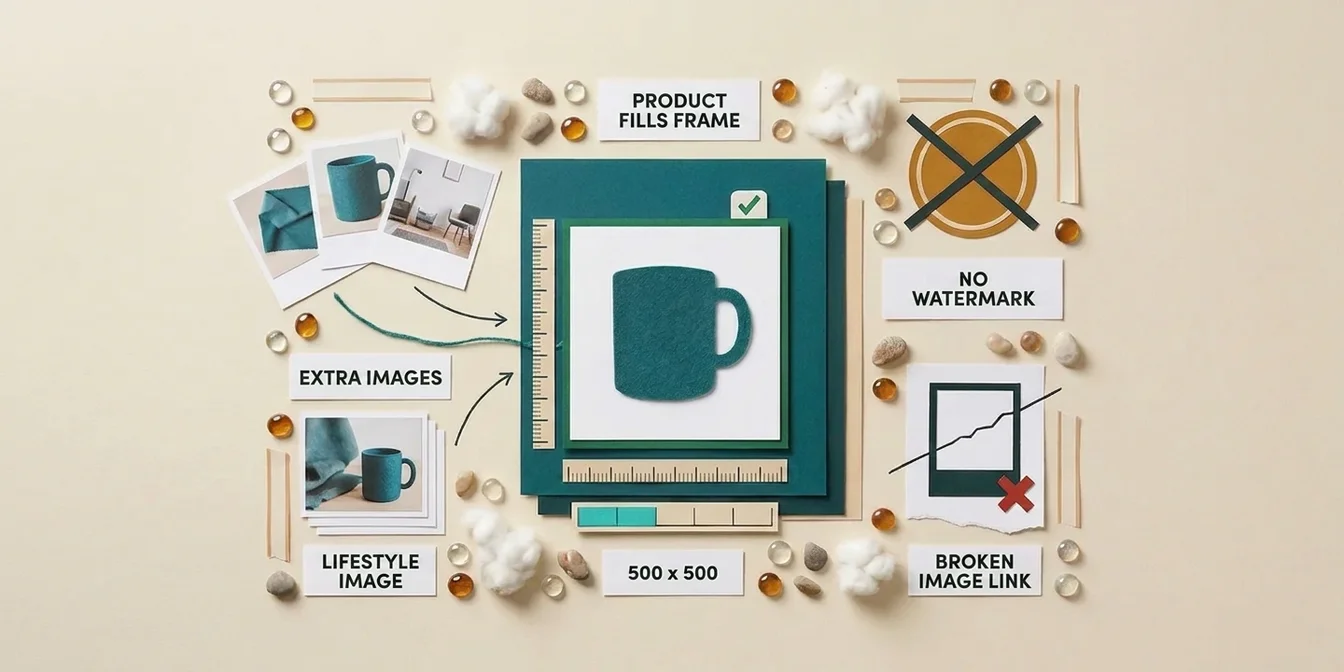
For Google Shopping product images, Google Merchant Center requires image_link to be at least 500 x 500 pixels (that limit only becomes a hard cutoff on January 31, 2027; right now it's still in a warning phase, more on that below), the product to fill 75% to 90% of the frame, and no watermark or promotional text on it. For best delivery across the Shopping tab, Performance Max, and Demand Gen, Google recommends 1500 x 1500 pixels or larger.
That's the short version. The longer version: product images are widely considered the second-biggest disapproval cause in Merchant Center, right behind price and availability mismatches (Google doesn't publish an official ranking, but several independent analyses agree on this order), and the lever most merchants neglect the hardest. You can automate a title fix for 5,000 products in one afternoon. You can't fix an image nobody has flagged as violating one of these four rules.
Checking where your own images stand doesn't require clicking through the feed by hand. The free feed check reads image_link and additional_image_link straight from your feed and flags resolution, missing secondary images, and common banned zones per product.
The required spec for image_link
Every main image has to clear four conditions at once. Miss one and the product gets disapproved outright, not just limited, with one exception: the resolution rule is still in its warning phase until January 31, 2027 (details in the next section).
| Requirement | Spec | Source |
|---|---|---|
| Minimum resolution | 500 x 500 px | Google Merchant Center Help |
| Recommended resolution | 1500 x 1500 px or larger | Google Merchant Center Help |
| Product fill | 75-90% of the frame | Google Merchant Center Help |
| File size | max 16MB, max 64 megapixels | Google Merchant Center Help |
What's explicitly off-limits: watermarks, brand logos (unless physically part of the product), price badges, "SALE" text, or any other promotional element covering the product. Google's enforcement on this has gotten reliably automated. One discount sticker in the frame is enough to trigger a disapproval.
File format is your choice: JPEG, PNG, GIF, BMP, TIFF, and WebP are all accepted. Pick WebP when you're generating new images. Smaller files load faster, and Googlebot crawls your image set more consistently when response times stay low.
The 500x500 rule: what changes in 2027
Since April 14, 2026, Google has been warning on images under 500 x 500 pixels. Starting January 31, 2027, that warning turns into a hard disapproval. There's no grace year in between, just a warning window that's already running.
Until then, the actual enforced floor is much lower: 100 x 100 pixels, or 250 x 250 for apparel. An image in that range still passes today, flagged with a warning in Merchant Center, not disapproved.
What to do this week: export image_link for your entire feed and check the actual pixel dimensions, not just whether a link is set. A working link to a 300x300px thumbnail passes today and stops passing the moment the January 2027 rule kicks in. If your catalog still carries product photos from an import done three years ago, this is where you'll find most of the hits.
Google explicitly frames AI upscaling as a stopgap, not a license to keep shipping permanently low-resolution source images. Replace the source where you can instead of just scaling it up.
additional_image_link: the lever almost nobody pulls
Up to ten extra images per product are allowed through additional_image_link, and most feeds use zero of them. That's exactly where the measurable CTR difference sits, not on the main image.
The core finding: several e-commerce write-ups, including a BigCommerce study cited by Channable, report roughly 27% higher CTR for listings that pair a standard product shot with a lifestyle image versus listings showing only one image type. There's no independently verified primary source behind that number, so treat it as an industry rule of thumb, not a Google-confirmed fact.
The division of labor that follows:
- Main image (
image_link): neutral white background, product centered, 75-90% fill. This is the field Google enforces hardest. - Extra images (
additional_image_link): additional angles and close-up detail shots of the product itself, up to ten per product. Google's own guidance holds these to the same banned-content rules as the main image (no watermarks, logos, or promotional text), but explicitly allows product staging and in-use shots here, even ones that don't show the entire product. - Lifestyle image (
lifestyle_image_link): a separate, optional attribute for context shots that show the product in real use, worn by a model or staged in a room. The CTR effect above sits on this attribute, not onadditional_image_link.
Variants carry their own requirement: every color or pattern variant needs its own image_link. A gray and a red sweater grouped under the same item_group_id but sharing one product photo don't just look sloppy, they're a direct policy violation under Google's rules. How to group variants correctly through item_group_id is covered in the feed attributes guide.
The most common image mistakes that trigger disapproval
The same three patterns show up regardless of industry or feed size.
- The link points to the product page instead of the image file.
image_linkhas to point directly to a.jpg,.png, or.webpfile. A link to/product/123instead of/product/123/image.jpgtriggers the "invalid image" error, even though a human clicking it sees the right picture. - Placeholder or "image not available" graphics. These often run unnoticed for months because the attribute is technically populated. A feed check that only verifies "field filled" instead of image content won't catch this.
- Robots.txt blocking Googlebot-Image. If your CDN or storefront platform locks out the image crawler, Google sees a blank image no matter how good the file itself is. This is the error that survives longest undetected, because everything looks normal in a browser.
All three share one trait: they're invisible as long as you're only eyeballing the feed in a browser. They become visible once something actually checks the delivered image file, not just the link.
Checklist: audit your Google Shopping product images in 15 minutes
Not a full audit, but the part with the best effort-to-payoff ratio:
- Export
image_linkfor the whole feed and check the pixel dimensions of your ten oldest entries (bycreated_ator import date). - Look for duplicates: the same image URL on more than three different
idvalues is almost always a placeholder. - Open five random main images and visually check for watermarks, price badges, or logos.
- Count how many products have at least one
additional_image_linkset. Under 20% is untapped upside. - For variant products spanning multiple colors, group by
item_group_idand count the distinctimage_linkvalues per group: exactly one value despite multiple colors means at least one variant is showing another color's photo.
How FeedOptimizer.AI helps
FeedOptimizer.AI doesn't generate product images. That stays your photographer's or your PIM's job, on purpose. What the tool takes over is the legwork before that: catching which images actually have a problem before Google tells you through a disapproval.
For every product, FeedOptimizer.AI checks:
- Whether
image_linkis set and resolution is sufficient, visible right in the product report, not as an isolated warning that gets lost - Whether
additional_image_linkis used, flagging products with no secondary image as an open optimization item - Whether variant products share identical images, a common silent bug in generated color or size variants
- How missing image data affects serving eligibility, visible in the same overview as title and attribute gaps
The output isn't a new photo, it's a prioritized list: which products need a better shot first, and which just need a corrected link. What that's worth across your whole catalog is easy to run through on the pricing page.
Frequently Asked Questions
What's the minimum resolution for a Google Shopping product image?
A hard disapproval threshold of 500 x 500 pixels kicks in on January 31, 2027. Until then, only a warning phase applies (since April 14, 2026), and the actual floor is still 100 x 100 pixels (250 x 250 pixels for apparel). 1500 x 1500 pixels or larger is already recommended so the image scales well across the Shopping tab, Performance Max, and Demand Gen.
How much of the frame should the product fill?
Between 75% and 90%. Less looks like a small, unimportant product, and more leaves no room for context and can read as cropped.
Can I show a watermark or price badge on the main image?
No. Google explicitly bans watermarks, logos (unless physically part of the product), price stickers, and any promotional element on the main image. These are a common, easily avoidable disapproval cause.
Does additional_image_link actually drive more clicks?
Additional images mainly add context about the product itself, not automatically more clicks. The often-cited 27% CTR lift (from a BigCommerce study cited by Channable, without an independently verified primary source) applies to adding a lifestyle image through the separate lifestyle_image_link attribute, not to additional_image_link in general. Up to ten additional images per product are allowed through additional_image_link.
Do color variants need their own images?
Yes. Every color or pattern variant inside an item_group_id needs its own image_link showing that specific variant. Sharing one base image across multiple variants violates Google's policy. Our own database shows how common the pattern is: across 16,647 variant groups with at least two products and an image set (195,211 products across 39 feeds and every industry in our database), 21.1% share a single image across all variants. Most of those are size-only variants, where reusing the image is fine. But even among the 3,456 groups spanning multiple colors (also part of the 16,647 total), 3.7% carry just one image, which means at least one color variant is advertised with a photo of a different color (our own analysis, as of September 3, 2026).
Bottom line: images are a feed attribute, not a design afterthought
Product images usually get handed off to marketing while title, price, and attributes get treated as a technical checklist. That split is backwards. image_link is a feed attribute like any other, with a spec Google enforces just as hard as it does gtin or availability. additional_image_link follows the same banned-content rules (no watermark, no logo, no promotional text), just with more permitted contexts, like staging and in-use shots, than the main image allows.
Three things to take away:
- Check resolution now, not in January 2027. The warning phase is already running; the disapproval phase arrives with a deadline attached.
- Lifestyle images are the underused CTR lever. Studies put the lift from combining image types at around 27%, and even without an independently verified primary source, that's not a number to ignore.
- Variants need their own images. Sharing a base photo across an
item_group_idis a policy violation, not a stylistic shortcut.
The fastest first step: export image_link for your ten oldest products and check the pixel dimensions. If that turns up hits, the full export is worth running.