How do I reduce my Google Shopping CPC?
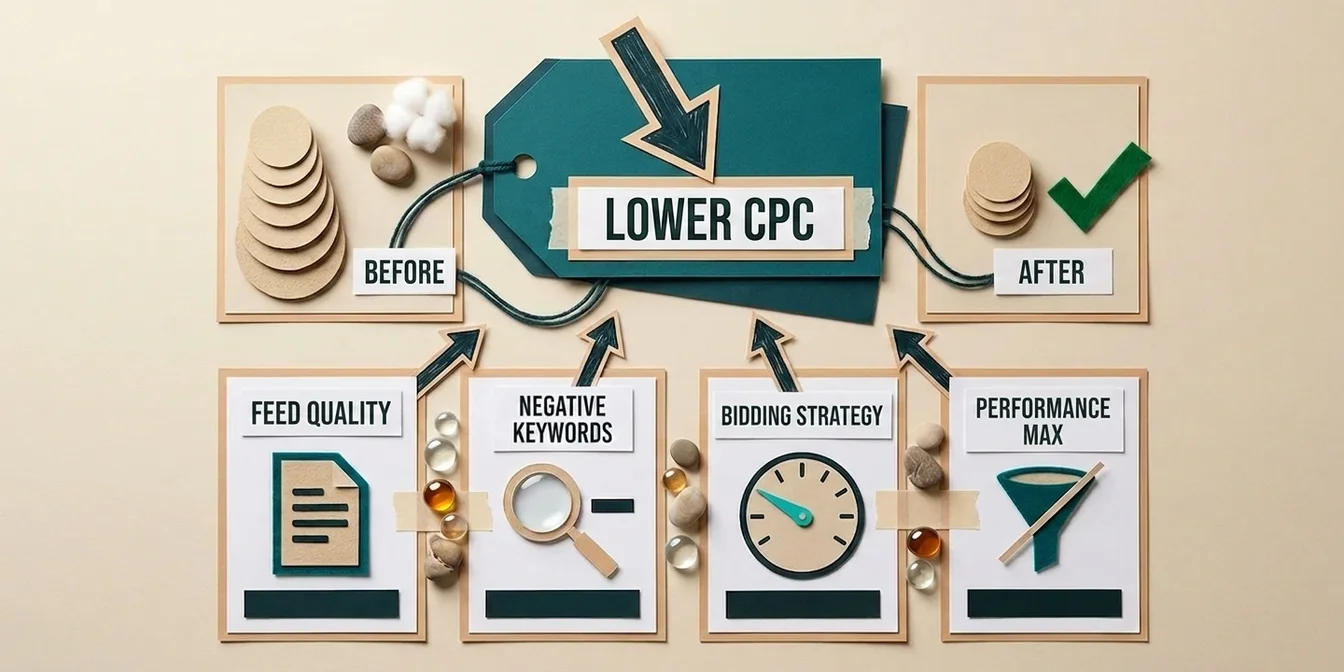
You reduce your Google Shopping CPC by increasing the relevance of your product data – because cost per click isn't a fixed number, it's the result of your bid and the ad relevance Google assigns to your listing. The more relevant your feed, the higher your Ad Rank – which means you win the same position at a lower click price, or a better position at the same bid. In practice: optimized titles, complete attributes, sharp images, negative keywords, and a disciplined bidding strategy all lower your effective CPC without raising your budget.
That's the key takeaway of this guide: trying to cut CPC by lowering your bid alone costs you visibility. Cutting it through relevance wins you clicks and saves money at the same time. The effect is well-documented from Search ads, where Quality Score is visible: accounts with high ad relevance (Quality Score 8–10) typically pay 30–50% less per click than accounts with mid relevance (Quality Score 4–6) – at the same position. In Shopping this score is hidden, but the relevance principle applies just the same.
This article gives you the five most effective levers, a 2026 industry CPC benchmark table, and a worked example showing how a 30% lower CPC translates straight into budget.
What determines your Google Shopping CPC?
Unlike Search ads, Google Shopping has no visible Quality Score and no self-selected keywords. Instead, Google uses your product data to decide which search queries trigger your ad – and how much you pay per click. Your actual CPC is the Ad Rank of the next-ranked competitor divided by your own relevance, plus a tiny increment. That means two merchants with identical bids pay different click prices if their feed quality differs.
Three signals feed into that relevance:
- Product data quality – title, description, attributes, GTIN, image quality. The more complete and precise, the better the query matching.
- Expected click-through rate (CTR) – Google estimates how likely shoppers are to click your product. Weak titles and images lower expected CTR and push your CPC up.
- Bid and bidding strategy – your maximum cost per click or your target ROAS.
The average Google Shopping CPC is about $0.66 according to Store Growers 2026 – roughly 87% cheaper than the average Search CPC of $5.26. So Shopping is structurally cheap to begin with. That doesn't change the fact that within Shopping you can pay double or half, depending on feed quality.
Lever 1: Feed quality – the biggest CPC lever
Feed quality is by far the most effective lever, because it's the only factor that improves CTR, relevance, and impression share at the same time – lowering CPC without touching your bid. A well-optimized feed lowers click price, raises CTR, improves conversion rate, and expands reach – all at once, with no budget increase. If you do only one thing from this article, do this.
Titles: keyword-first, not brand-led
The product title is the single most important relevance signal in your feed. Google scans the title to decide which search queries your product appears for. Keyword-first titles (e.g. "Waterproof Men's Hiking Boots Salomon X Ultra 4 Gore-Tex") tend to earn substantially higher CTRs than brand-led titles – in practice the lift often lands in the double-digit to mid-double-digit percent range – and higher CTR means higher relevance and therefore a lower CPC. The full playbook is in our guide to product title optimization.
Complete GTIN, MPN, and brand data
Missing or incorrect GTINs limit Shopping eligibility, exclude you from comparison-shopping features, and push your CPC up. Products with correct identifiers measurably outperform identical products without them in the auction. Which attributes are mandatory and how to populate them cleanly in the Merchant Center is covered in our Google Merchant Center setup guide.
Images and descriptions
High-resolution images (Google recommends 1500×1500 px) consistently earn better CTRs in the Shopping carousels – which lifts your Quality Score over time and lowers your CPC. Descriptions of 500+ characters expand your keyword coverage and improve query matching. More on this in our guide to optimizing product descriptions.
Clear every data-quality warning
Merchant Center warnings that don't cause an immediate disapproval often get ignored – an expensive mistake. They quietly suppress reach and raise your CPC. The most common errors and how to fix them are detailed in avoiding Google Shopping feed errors.
Lever 2: Negative keywords & query sculpting
Negative keywords are the fastest way to lower your effective CPC, because they eliminate clicks that would never convert. Systematically excluding irrelevant queries commonly saves 20–30% of ad spend – money previously burned on clicks with no purchase intent. This doesn't lower the nominal CPC of a single click, but it lowers the CPC per valuable click – which is what actually matters.
Typical low-intent negative keywords to exclude in phrase match:
- "free," "cheap"
- "used," "second hand"
- "how to," "repair," "DIY"
- "review," "comparison," "vs"
- competitor brand names you don't want to rank for
Advanced merchants pair negative keywords with query sculpting: multiple campaigns with different priorities route queries into the right campaign. Priority decides which campaign fires first; negative keywords filter the queries; the bid sets the position. This way you pay less for expensive generic queries than for high-intent long-tail ones.
Lever 3: Campaign structure & product groups
A deliberate structure lowers your CPC because it lets you assign different bids to different products instead of paying one price for everything. Best sellers, high-margin items, and long-tail products belong in separate product groups – so no low-margin product subsidizes your top revenue driver with inflated click prices.
A practical split:
| Product group | Bidding logic | Goal |
|---|---|---|
| Best sellers | higher bid, aggressive target ROAS | maximize visibility |
| High-margin products | medium bid, profitable target ROAS | scale profit |
| Long-tail / niche | low bid, defensive | capture cheap clicks only |
| Low-margin / clearance | very low bid or exclude | stop burning budget |
Running every product in a single group with one flat bid means paying the same CPC for your weakest products as for your best – and wasting budget.
Lever 4: Choose the right bidding strategy
Your bidding strategy decides whether Google overpays for you or bids with discipline. Smart Bidding strategies with target ROAS or target CPA stop you from paying more in expensive auctions than a click is worth to you – provided you've gathered enough conversion data. The right choice depends on your data volume.
A proven progression:
- Start: "Maximize Clicks" or manual CPC – while you still have no conversion data. Manual CPC gives you a hard ceiling per click.
- After ~30 conversions: "Maximize Conversions" – Google optimizes for sales, not raw clicks.
- With stable data: "Target ROAS" – you set the target ROAS and Google steers bids so the click price matches expected conversion value.
Your target ROAS should be a function of your margin, not your competitors'. How to calculate it correctly is in our Google Shopping ROI guide. Don't set it too aggressively – Smart Bidding needs learning room, or Google throttles delivery.
Lever 5: Keep Performance Max on a tight leash
Performance Max can lower your CPC or blow it up – depending on how tightly you steer it. Without brand exclusions and negative keywords, PMax spends your budget on cheap-but-worthless brand and junk queries that flatter the stats but bring no new customers. In early 2025, Google raised the PMax negative keyword limit from 100 to 10,000 and rolled out campaign-level lists – use them.
Three knobs for a lower CPC in PMax:
- Exclude brand queries if you capture brand traffic separately (and more cheaply) through a dedicated campaign.
- Use account- and campaign-level negative keywords to block low-intent queries.
- Use a supplemental feed to test optimized titles risk-free against the original before you scale.
Why feed quality is decisive specifically in PMax is covered in Performance Max feed quality.
2026 CPC benchmarks by industry
To know whether your CPC is too high, you need reference points. The figures below come from current 2026 benchmark analyses (Store Growers, Foundry CRO) and represent industry consensus for Google Shopping. Important: a high CPC isn't automatically bad – what matters is its ratio to margin and conversion rate.
| Industry | Average Shopping CPC | Characteristic |
|---|---|---|
| Food & grocery | $0.50–$0.60 | cheap, high volume |
| Home & garden | $0.55–$0.75 | medium competition |
| Apparel & fashion | $0.60–$0.90 | high competition, good margin |
| Sports & outdoor | $0.65–$0.95 | seasonal |
| Furniture & home | $0.80–$1.10 | high AOV, longer cycle |
| Electronics | $1.20–$1.45 | expensive, thin margin |
| Industrial & B2B | $1.30–$1.50 | priciest segment |
For context, the general 2026 performance benchmarks:
| Metric | Industry average |
|---|---|
| Cost per click (CPC) | ~$0.66 |
| Click-through rate (CTR) | 0.86% |
| Conversion rate (CR) | 1.91% |
| Cost per action (CPA) | ~$38.87 |
Interpretation: Electronics averages $1.33, roughly 2.4× the cost of food and grocery ($0.55) – while carrying thinner margins. If your CPC sits well above your industry average, it's almost always a relevance or feed problem, not a bidding problem.
Worked example: what a 30% lower CPC delivers
Theory is fine, a number is better. A 30% lower CPC means roughly 43% more clicks on the same budget – and, at a constant conversion rate, roughly 43% more revenue without a single extra dollar of budget. Here's the math for a mid-sized store:
| Metric | Before | After (CPC −30%) |
|---|---|---|
| Monthly budget | $1,000 | $1,000 |
| CPC | $0.90 | $0.63 |
| Clicks | 1,111 | 1,587 |
| Conversion rate | 1.9% | 1.9% |
| Orders | 21 | 30 |
| Average order value | $95 | $95 |
| Revenue | $1,995 | $2,850 |
From the lower click price alone, revenue rises by over $850 a month – on an identical budget. If feed optimization also lifts conversion rate in parallel, the effect is even larger. That's exactly why CPC is the metric where feed work pays off fastest. How to calculate the resulting ROI cleanly is in our ROI guide.
The most common mistakes when reducing CPC
When trying to push CPC down, merchants make the same mistakes over and over – and often hurt their performance doing it. The biggest mistake is lowering CPC through your bid alone instead of through relevance: cap the bid and you lose impression share, position, and ultimately profitable clicks.
- Cutting the bid too early and too hard – you lose visibility before optimization kicks in.
- Forgetting negative keywords – you keep paying for queries with no purchase intent.
- Ignoring the feed – the biggest lever stays unused because it takes work.
- Smart Bidding without data – target ROAS without conversion history leads to erratic bidding.
- All products in one group – weak products burn the budget of your strong ones.
If you want a feed-management tool that automates exactly these levers, see our feed management tools comparison 2026. And for risk-free testing of optimized data, you'll want a supplemental feed.
Frequently Asked Questions
What is a good CPC for Google Shopping?
A "good" CPC depends on your industry and margin. The cross-industry average in 2026 is around $0.66. Food and grocery sit at $0.50–$0.60, electronics at $1.20–$1.45. What matters isn't the absolute CPC but whether it fits your margin and conversion rate – a $1.20 CPC can be profitable at high margin, while $0.40 is a loss at thin margin.
How fast does feed optimization lower CPC?
Title and image optimizations usually take effect within 2–4 weeks, as Google re-evaluates the improved relevance and CTR. GTIN and attribute corrections often work within 1–2 weeks. Negative keywords lower your effective CPC immediately, because worthless clicks disappear right away.
Does a lower bid reduce CPC?
A lower bid reduces your maximum CPC, but usually at the cost of position and impression share – you get less and worse visibility. The sustainable way to lower CPC is higher relevance: with a better Ad Rank you automatically pay less for the same position without losing reach.
How does Quality Score affect CPC?
Even though Google Shopping shows no visible Quality Score, the same principle as Search ads applies: higher ad relevance lowers the click price. In Search ads, accounts with high relevance (Quality Score 8–10) typically pay 30–50% less per click than accounts with mid relevance (4–6).
Do negative keywords help in Performance Max too?
Yes. Google now allows up to 10,000 negative keywords per PMax campaign and has rolled out campaign-level lists. With them you block low-intent and brand queries that look cheap but bring no new customers. That noticeably lowers your CPC per valuable click.
Conclusion: lower CPC through relevance, not your bid
CPC in Google Shopping isn't a constant of nature – it's the product of your feed quality, your query control, and your bidding discipline. Push it down through the bid alone and you lose visibility. Lower it through relevance and you win more clicks and lower costs at the same time.
The 5 most important takeaways:
- Feed quality is the biggest CPC lever – titles, GTIN, images, and descriptions lower click price through higher relevance.
- Negative keywords save 20–30% of budget – eliminate clicks with no purchase intent.
- Structure beats a flat bid – separate best sellers, high-margin, and long-tail products.
- Smart Bidding only with data – start manual, switch to target ROAS only with conversion history.
- Higher Ad Rank = lower CPC – relevance is the only way to lower CPC without losing reach.
Once your feed is clean, the next question isn't "how do I lower my bid?" – it's "where is the next 10% improvement in relevance cheapest?" And the answer is almost always: in the feed. If you want to automate that, take a look at our plans.